
When it comes to scaling your business, selecting the right ERP solution can be a game-changer. The market offers numerous ERP platforms, but two of the most popular options are Oracle NetSuite and Microsoft Dynamics 365 Business Central. Both solutions are cloud-based and designed to help small to mid-sized businesses streamline their operations, improve productivity, and enhance financial visibility.
ERP adoption continues to accelerate, with the global ERP software market projected to grow from $106.22 billion in 2026 to $281.58 billion by 2034, as more organizations invest in integrated systems for finance, operations, and reporting.
However, while they may appear similar on the surface, these platforms cater to different needs and offer varying features. In this guide, we’ll dive deep into NetSuite vs. Business Central, exploring their key similarities and differences, pricing, customer reviews, and more. Our goal is to help you make an informed decision on which ERP system is the best fit for your specific business needs.
Oracle NetSuite: A True Cloud ERP
NetSuite is a comprehensive cloud-based ERP solution with a long history of supporting businesses across various industries. As a multi-tenant, true cloud ERP, it offers a unified platform designed to manage all aspects of a business, including financial management, revenue management, inventory, procurement, human resources, and more. NetSuite has been a leader in the ERP space for over two decades, gaining the trust of over 40,000 customers worldwide.
One of NetSuite’s key strengths is its SuiteCloud platform, which enables businesses to customize the system to meet their unique needs deeply. Whether you need custom workflows, fields, or third-party integrations, NetSuite’s maturity and flexibility make it a go-to choice for organizations that require extensive tailoring to their operations.
Microsoft Dynamics 365 Business Central: A Newer Cloud-Based Solution
Introduced in 2018, Microsoft Dynamics 365 Business Central is the latest offering in Microsoft’s ERP portfolio. While it’s based on the legacy Microsoft Dynamics NAV platform, Business Central was reimagined as a modern, cloud-native solution designed to help small to medium-sized businesses manage their operations. Built on the Microsoft Azure cloud platform, Dynamics 365 Business Central offers strong integration capabilities with other Microsoft tools, such as Power BI, Microsoft Flow, and Cortana.
Although Business Central is newer to the cloud ERP market, it is backed by Microsoft’s powerful technology stack, which has contributed to its growing popularity. However, its flexibility in customization is more limited compared to NetSuite’s mature SuiteCloud platform.
Integration and Ecosystem Fit: NetSuite vs Microsoft Dynamics 365
For many buyers, the decision is not just about features. It is also about how well the ERP fits into the rest of the company’s technology stack. This is where NetSuite vs Microsoft Dynamics becomes a practical evaluation of ecosystem strategy, not just software selection.
Microsoft Dynamics 365 Business Central appeals to organizations already invested in the Microsoft ecosystem, especially those that rely on Microsoft 365, Power BI, and related business applications across departments. For these companies, Dynamics can feel like a natural extension of tools already used every day.
NetSuite, by contrast, is designed as a more unified cloud ERP environment with broad native functionality and flexible integration options. For organizations that want to reduce system sprawl and manage more business processes inside one platform, that difference can matter as much as the feature list itself.
At Techfino, we often help organizations extend the value of NetSuite by connecting it with CRM platforms, e-commerce systems, and other operational tools through Custom NetSuite Integrations, ensuring data flows seamlessly across the entire business.
Key Differences Between NetSuite and Dynamics 365 Business Central
While both NetSuite and Business Central are cloud-based ERP solutions, they serve different market segments and provide distinct functionalities. Let’s explore the key differences between the two.
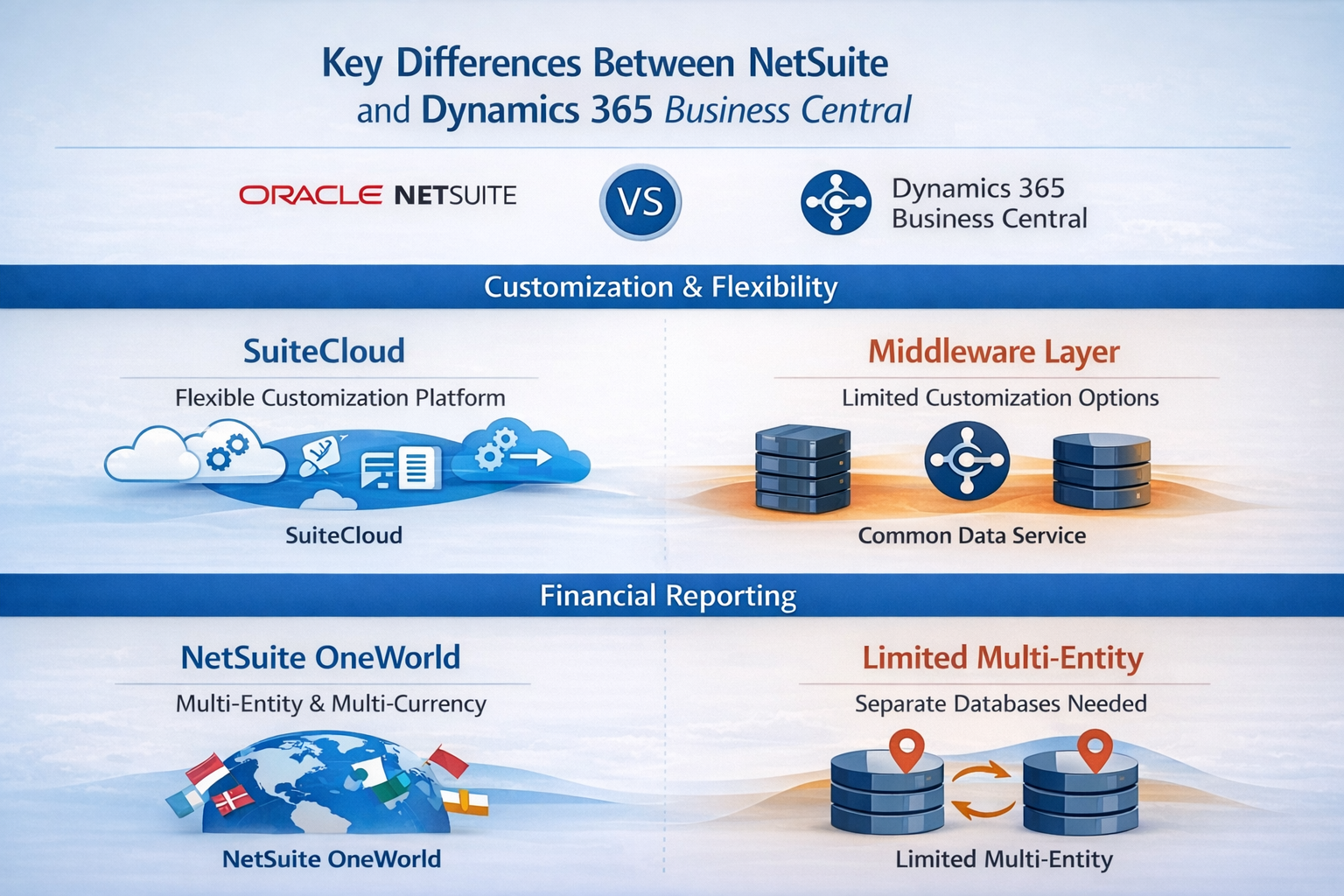
Customization and Flexibility: NetSuite’s SuiteCloud vs. Business Central’s Middleware Layer
NetSuite is renowned for its ability to be highly customized to meet the specific needs of its users. SuiteCloud, NetSuite’s robust platform for customizations, allows businesses to tailor their ERP system through custom scripts, workflows, and even build third-party extensions. This gives businesses a significant amount of flexibility, allowing them to adapt the system to ever-evolving needs without limitations.
In contrast, Business Central lacks the same level of deep customization options that NetSuite offers. While it does provide basic customization capabilities, these require a developer to make changes using Visual Studio, which can be time-consuming and may result in extra costs from third-party developers. Additionally, Business Central’s integrations with other Microsoft tools require a middleware layer, the Common Data Service, which can further complicate the integration process.
This lack of flexibility means that businesses with more complex requirements may face challenges when trying to make Dynamics 365 Business Central work for them.
Financial Reporting: Real-Time Insights vs. Customization Needs
NetSuite excels in providing real-time financial insights through its powerful reporting tools. The platform’s built-in capabilities offer customizable dashboards, automated reports, and saved search functionality, ensuring that decision-makers always have access to the most up-to-date and accurate data. With NetSuite, businesses can easily drill down into specific data points, gaining the financial insights needed to make informed decisions quickly.
On the other hand, Business Central offers limited out-of-the-box reporting features, with many of its reports lacking flexibility or the ability to drill down into specific transactions. While external tools like Power BI can provide additional reporting capabilities, implementing them through partners adds time, cost, and complexity to the process. For businesses that need deep, real-time financial visibility, NetSuite’s comprehensive reporting tools are a clear advantage.
Multi-Entity and Global Operations: NetSuite’s OneWorld Advantage
Businesses operating across multiple countries or with multiple subsidiaries need an ERP system that can support global operations seamlessly. NetSuite’s OneWorld solution offers comprehensive multi-entity and multi-currency support, allowing businesses to consolidate financial data across different subsidiaries without the need for additional customization or third-party tools. It also provides built-in global tax compliance features, which make it easier for businesses to adhere to international regulations.
In contrast, Business Central does not provide native support for multi-entity financial consolidation. Instead, it requires separate databases for each entity, making it difficult to manage financial operations across subsidiaries. This approach can increase costs and complexity, especially as businesses expand their global presence.
If you plan to grow your business internationally or manage multiple subsidiaries, NetSuite’s built-in multi-entity functionality offers a more streamlined solution.
| Category | Microsoft Dynamics 365 Business Central | Oracle NetSuite |
|---|---|---|
| Financial Management | AP, AR, GL, multi-currency, fixed assets, forecasting, and budgeting | AP, AR, GL, multi-currency, fixed assets, multi-company consolidation, revenue recognition, subscription billing, forecasting, and budgeting |
| Supply Chain | Order management, procurement, inventory management, shop floor management, quality management, demand forecasting, agile manufacturing, product configuration | Order management, production management, inventory management, procurement, warehouse and fulfillment, demand planning, WIP and routing, work orders and assemblies, shop floor control, BOM maintenance |
| Human Capital | No native capabilities listed in this comparison | Human resources management, payroll |
| Commerce | No native capabilities listed in this comparison | POS, ecommerce, order and inventory management, product content management, commerce marketing automation |
| Professional Services Automation | Project management | Project management, resource management, timesheet management, and expense management |
Pricing Comparison: Initial Costs and Long-Term Value
When evaluating ERP solutions, pricing is often a significant factor in the decision-making process. Here’s a closer look at the cost structures of NetSuite and Dynamics 365 Business Central.

White paper

What if NetSuite support actually worked?
See the Continued Success difference.
Get the WhitepaperNetSuite Pricing
NetSuite follows a subscription-based pricing model, with base licensing typically starting around $999 per month, though total costs vary depending on user count, modules, and implementation requirements. However, the total cost of ownership will depend on the number of users, selected modules, and the level of customization required. Additional costs for professional services, such as implementation, training, and data migration, can add high upfront costs.
Many organizations also integrate NetSuite with existing systems during implementation, and working with an experienced partner on NetSuite Integration Services can help ensure those systems connect smoothly from day one.
One of the key benefits of NetSuite’s pricing model is its SuiteSuccess implementation program, which offers a more predictable and structured approach to deployment. This helps businesses avoid unexpected costs and delays, making the implementation process more efficient.
Dynamics 365 Business Central Pricing
Business Central offers a more affordable entry point, with pricing that currently starts at $80 per user per month for Essentials and $110 per user per month for Premium, though actual costs can increase with user count, configuration, and add-ons. However, it’s important to note that Business Central’s pricing can increase quickly depending on the number of users, customization needs, and additional add-ons required for specific functionalities.
While Business Central’s initial costs may appear lower than NetSuite’s, businesses may face hidden costs as they scale. For instance, third-party integrations and customizations can lead to additional expenses. Therefore, companies should carefully assess their long-term needs before deciding on Business Central as their ERP solution.
| Pricing Factor | NetSuite | Dynamics 365 Business Central |
|---|---|---|
| Pricing Model | Subscription ERP pricing with modular add-ons | Per-user subscription licensing |
| Entry Cost | Base license + user licenses + implementation | Lower entry cost per user |
| Scalability | Designed for mid-market and scaling organizations | Often used by SMBs already in the Microsoft ecosystem |
| Customization | Extensive SuiteCloud customization | Customization through Microsoft development tools |
User Reviews and Customer Satisfaction
Customer satisfaction is a crucial factor when choosing an ERP solution. Both NetSuite and Dynamics 365 Business Central have garnered reviews from users, but there are some differences in their overall ratings.
NetSuite maintains strong user satisfaction ratings on platforms such as G2, where users frequently highlight its scalability, flexibility, broad functionality, and recognition as a leader in the Gartner Magic Quadrant for cloud ERP solutions. Users appreciate its broad functionality, flexibility, and scalability, though some mention that the platform can be complex to set up and requires a significant investment for customization.
Dynamics 365 Business Central also receives positive reviews on platforms like G2, with users often praising its integration with Microsoft tools and its familiarity for teams already working within the Microsoft ecosystem. Users highlight the platform’s integration with other Microsoft tools and its ease of use, but some frustrations arise around its limited reporting capabilities and the complexity of customizing the platform.
Support: Accessibility and Resources
When it comes to support, both NetSuite and Business Central offer robust options, but NetSuite excels in terms of availability and depth.
NetSuite provides 24/7 support, including phone support, a comprehensive knowledge base called SuiteAnswers, and a wide range of training options. Additionally, NetSuite offers specialized support for system optimization through its Advanced Customer Support (ACS) program.
Business Central provides support during regular business hours and offers online resources, including a knowledge base and user forums. However, many users report that the support experience is less responsive than NetSuite’s, particularly when it comes to complex issues or customizations.
Business Central or NetSuite: Which ERP Fits Your Growth Strategy?
In conclusion, the choice between NetSuite and Dynamics 365 Business Central depends largely on the complexity and scale of your business needs.
- If you require a comprehensive, highly customizable ERP solution with advanced financial reporting, multi-entity support, and seamless global operations, NetSuite is the better choice. Its maturity, extensive customization capabilities, and built-in functionalities make it a powerful tool for businesses looking to scale efficiently.
- If your business is smaller or primarily uses Microsoft tools and you have relatively simple ERP needs, Dynamics 365 Business Central may be a more affordable and suitable option. While it lacks some of the advanced features of NetSuite, it offers solid core functionalities and excellent integration with other Microsoft products.
Ultimately, choosing the right ERP system comes down to assessing your current needs and long-term goals. Whether you choose NetSuite or Business Central, both platforms have their strengths and can help you optimize your business operations. However, for businesses with complex needs, NetSuite’s true cloud ERP solution stands out as the more flexible and scalable option.
Get Started Now
The easiest way to get started is to contact Techfino today. If you’d like a little more information first, you can download our ContinuedSuccess Whitepaper. Either way, we hope you’ve found this guide helpful and hope that we can further assist you on your path to leveling up your NetSuite Support.